Training is a crucial part of successfully implementing technology in the workplace to improve overall performance. It goes without saying, but if people don't know how to use the technology to their advantage it will be treated as an obstacle and ultimately rejected.
Many people I have met in the IT industry are bright and talented when it comes to the technical aspects of their job, but some have admitted to me personally when they need to link the people to the technology they are using - teaching them how to use the technology - it's not one of their strengths.
A Knol has been created on this topic, Building Effective Training in Five Easy Steps. I think it will help those in the industry who have been assigned to conduct training in their workplace and I invite anyone to read it and contribute to it if they have any additional insight on the subject.
Training doesn't have to be a difficult task if you know and understand its fundamentals.
Friday, August 1, 2008
Building Effective Training in Five Easy Steps

Wednesday, March 5, 2008
Say What You Mean - Proper Labeling to Avoid Confusion in User Interfaces
The lack of posts on this blog have been due to some recent projects taking up most of my time. Because of this, my blogging has suffered. Perhaps I need to heed the advice of this blog post, set up my own blogging regimen and work it into my schedule.
Until I get a regimen developed, my blogging will be more spontaneous. When an opportunity where people can learn about good usability and design techniques presents itself and I can quickly write about it, I should take it!
A current project where I deliver training on a content management application to groups of new end-users presented such and opportunity.
I didn't design the interface of the application - I just train on it. It seems when the application was designed, the developers didn't fully understand the end-user and how they understand the content they manage. The application I teach allows end-users to set up metadata for their document and then upload their document (file or files) to the system. To do this, the button that activates this function is labeled "Add Content".
Sounds easy enough.
If an end-user wishes to upload a new version of the document, the button to activate this feature is "Add Rendition". This has been a source of confusion for many end-users. During the training sessions I deliver, I usually find myself spending more time explaining what the developers meant by the word "rendition" rather than demonstrating the actual functionality.
Note: the functionality of adding content and adding a new version of previously uploaded content is the same.
The reason for the confusion is the naming conventions end-users reference (in their minds) when they wish to work with content. Adding content is easy to understand. They upload a file or files to the system if it has not been added before. Adding a rendition is not so easy to understand. I'm not sure why this is confusion and I need to investigate it further. Rendition must have a completely different meaning to the end-users than the word version. Given the opportunity I will mention to the developers that the labeling of these functions is in need of review. We might have a simple fix on our hands, such as renaming or relabeling a button, that will reduce a great number of support calls and e-mails.
Through my training I have been able to uncover a usability stumbling block and it all stems from improper labeling and lack of understanding the end-users. The lesson learned is that developers need to understand how their end-users think, especially what they call things. Say what you mean, be literal and match what the end-users think.
Thursday, February 14, 2008
Implementing Technology Changes in the Workplace
I never considered myself and early adopter. Everybody seems to have one in their life, either among their circle of friends or within their family, but I'm not one of them.
A little more than a year ago, Microsoft released its Vista operating system. When the product launched I didn't run out right away and install it on my company's PC's. I waited on the sidelines like a lot of other people and stuck to what I knew worked for me, met my needs and what I was familiar with. I didn't want to change to something that was unproven and had little to no guarantee that it will work with my software and other hardware devices.
Late last month, I upgraded one of my computers and chose the Vista OS. Actually, I had no choice with the box I purchased. It was either Vista or nothing. After a year in service, I thought it was time to give the OS a try. To me, the change was inevitable. Eventually I would have to make the change because Microsoft will quit offering XP and will no longer support it in the near future.
A recent PC World article titled Why Users Hate Vista explained how change in an operating system is more emotional (to the end-users) than technical (for the IT personnel). When it comes down to it, any technical change for an end-user is emotional. It's human nature to resist change. Just ask my friend who wrote a recent post on his blog about change. Bottom line: people are creatures of habit and will prefer to keep things status quo. At minimum they will be very selective about the amount of change they are willing endure.
In business and the IT world, change is unavoidable if you want to remain competitive. I don't recommend change for the sake of change, but if it improves your business processes it should be implemented with thought and consideration for the end-user. After all, it is they who will be leveraging the technology to drive the business processes that bring about success.
How does one implement a technology change despite the emotional reaction people will have to it? The answer is Change Management.
Here are some tips and thoughts I have on this subject:
- Focus on the people - consult with the end-users. Include them in the decision making process when making changes to the technology they will be interfacing with. Work with them to identify their needs, the obstacles they wish to overcome and their overall objectives.
- Communicate strategic messages - discuss the reason for the change and solicit feedback. Clarify how everyone will be involved in the change and give them ownership in the implementation strategy.
- Communicate and train - provide ample notice and support for the new technology measure the results. Above all, maintain open lines of communication to allow end-users to ask questions and voice their concerns. Address them promptly.
Friday, November 2, 2007
Defining Design
Recently I found a great blog post on the subject of design. When we hear the word "design", what does it mean? Frank Spillers tells us in his post titled What is Design? (Yes, all 10 definitions!) at his blog, Demystifying Usability.
I hope Frank doesn't mind, but I commented and offered another definition of design (bringing the list to 11) that I think fits well within the framework of usability. How about instructional design?
When it comes to products, whenever we are able to support the transfer of knowledge in a logical, objective fashion or make it easier for people to learn how to operate products and apply them to their work, we increase the level of satisfaction surrounding the user experience. I know that usable products are supposed to be intuative and easy to learn in and of themselves, but there is always a need to support learning.
Just another definition of design to add to the list and I'm sure there are more to come.
Tuesday, September 4, 2007
User Interface Affordances Still Need Support
A fundamental principle in usability design and interaction design is something called an affordance. An affordance is a term made popular by Don Norman in his book The Design of Everyday Things
For instance, the angle or shape of a chair suggests that you use it to sit on. The rounded, softer and curved portion of a knife or hand tool suggests this is where you handle the instrument. Just take a look around and you’ll be surprised all of the affordances you see in the design of everyday items you use.
It’s even present in our technology.
Most software and web applications have affordances built into their interface to suggest certain actions or usage. Your typical web browser most likely has left and right arrow buttons near the top to suggest your web surfing experience is much like reading a book. If you want to turn back to the previous page you were viewing, you would click the left arrow button or “turn the page to the left”.
Good user interfaces will have these intuitive features built in. Still, there is a need for support systems to be in place in order to guide new users who may not hold the same paradigms or mental models of the persona you developed your application around. The support provided, usually through carefully designed tutorials or quick start guides, will give the user a sense of what is this (the application), what do I do with it and how will it be relevant to me.
That’s good support for any application.
Wednesday, June 20, 2007
Simulations Provide the Best Training
 "Ground Control to Major Tom..."
A recent BBC News story is reporting that the European Space Agency (ESA) is seeking volunteers for a study on the human behavior of potential Mars travelers. For 17 months these volunteers will be isolated in a simulated environment resembling a Mars journey (sans weightlessness and risk of radiation).
This relates back to my areas of interest - user-centered design and usability - in the form of training. As I speak with potential clients about their software, website and web applications, I discuss with them how end-user support in the form of help systems and training modules makes the user experience pleasurable and transfers new knowledge more effectively.
The ideal learning environment is a simulation. When you create learning conditions and training exercises that closely resemble the actual situation, retention of knowledge increases. The benefit to the software, website and web application developers or companies producing these products is lowered support costs. If end-users can find solutions to their problem and learn new things quickly and easily, that's less pressure on support staff.
You may not need to go to the same lengths as the ESA, but you can take a cue from them on how simulations can support your products. Just create a realistic, safe situation for folks to learn.
Friday, June 1, 2007
Experience is the Best Teaching Tool for Technology
 On a few occasions (like the one in this post) I have written about how best to train people on new technology once it is implemented in organizations. The subject has come up recently in discussions with potential clients looking for performance support systems and e-learning and it has reminded me of a model of learning theory I learned about years ago that best explains how to present training. It is especially interesting when you look at it through the prism of using multimedia to train end-users on software or web applications.
Edgar Dale was an educator who developed what was called the Cone of Experience Theory. The main idea of the theory is this -
The closer to the actual experience you can get your end-user to while they are learning will increase overall retention.
Think about it. Why do pilots train in flight simulators? Why do city, county, state and federal emergency personnel run disaster preparedness drills? It's a safe environment to learn in and reflect upon because they are doing the actual tasks that are as close as you can get to a real situation with little or no threat of causing critical errors.
It means much more to the learner if they can actually experience the situation they would be facing than to sit in a classroom, read books, listen to a lecture and watch videos or people demonstrating how to use a product. So, don't be afraid to put some prototypes or demos in the hands of your end-users. This is probably one of the easiest, most fundamental forms of usability testing you can do for your application.
More importantly, go back to your support materials and build some simulations. Let your end-users see, touch and feel (i.e. - experience) your applications. You'll be thankful you did because you'll provide your end-users a safe environment to practice in and as an added bonus you'll lower those support calls that are "how-to's", which can become time consuming for you and your business.
Thursday, April 19, 2007
Why Hire a Usability Consultant and What are The Benefits?
Note: Content for this blog post has been drawn from Usability First: Consulting.
Usable systems such as software and web applications should seem intuitive to the end-user, but getting there is not always as intuitive for programmers and developers.
What Do Usability Consultants Do?
Usability consultants work with designers and developers to analyze how an application meets end-user needs so that they can improve upon its concept to enhance productivity, increase overall end-user satisfaction, and minimize end-user errors.
If a usability consultant is brought in before a website or software application is created, they can help developers achieve consistent, usable results. This is the preferred model for development, as usability is built into the application rather than as an afterthought. Usability is not about making a user interface attractive. It encompasses issues such as information architecture, design, writing, and quality assurance. Usability goes way beyond the surface elements.
If usability is brought in after production, it can evaluate the usefulness of a website or software application by using one or more usability evaluation methods such as focus groups, job / task analysis and end-user testing.
Usability consultants usually offer such services as needs analysis, heuristic evaluation (often conducted through expert critique or usability testing), user interface design, and usability training.
What Are The Benefits Of Hiring A Usability Consultant?
- Increasing the usability of a website or software application results in increased productivity for the end-user.
- Bringing a usability consultant into the design and production process will reduce overall costs as it is more cost effective to build a usable application than it is to repair an unusable one.
- Doing a less than thorough job can cost more than money. It can cost time and customers.
- Usability consultants can evaluate systems more efficiently because they know what to look out for based on their experience with a wide range of systems.
- They can bring perspectives that those close to a project may not have considered. It is often difficult to be objective about your own work when you are closely tied to it.
- Consultants are trained in a range of usability evaluation methods. The advantage comes with knowing which method is best for each individual project.
- Having a usable application will result in satisfied, productive users with lowered support costs.
Monday, April 9, 2007
Using E-Learning to Train on Software and Web Applications
A colleague in the Boise area recently wrote a post in his blog on using e-learning to save money in corporations - provided it's used the right way.
Dan Bobinski is the owner and president of The Center for Workplace Excellence where he trains and writes on various workplace topics most owners, managers and even employees face on a day to day basis. Dan's post got me thinking about how e-learning is used to training people on software or web applications. Whether they are proprietary or off-the-shelf, really doesn't matter. The fundamental principles Dan discussed in his post hold true. I even offered my two-cents to expand upon what Dan discussed and I believe they support the principles.
Dan's points were as follows:
- You have to understand the nature of the work you intend to teach through e-learning.
- You have to understand at what level of learning the content resides in. Is it rote memorization (level 1)? Is it understanding and comprehension (level 2)? Is it application (level 3)?
Now, here's where my comments support Dan's points:
- Adult learners and their preferred style of learning will tend to fall anywhere from a structured, sequential pace to a random, exploratory pace.
- The higher levels of learning (level 3) and its content are the ones that tend to support the full range of adult learning styles.
- With a younger workforce who was practically raised on the internet entering the business world, they are going to demand their business education to be highly interactive and emulate Web 2.0 features such as blogging, forums, live chats, etc. to hold their attention and motivate them.
E-learning is a great training tool that can be expensive, but in the long run it can be cost-effective provided it is used correctly and the content accommodates the need for an interactive environment.
Friday, March 16, 2007
Learning About Technology By Using It
Since I decided to go "back to my roots" in this week's posts, I was reminded of an event that occurred at one of the companies I worked at long ago. I think by telling you about certain aspects of that event it will demonstrate how human performance improvement and its subset, training, plays a role in PinPoint's mission to help companies integrate technology in their organizations to improve overall performance.
I don't want anyone to think that just because I was trained on how to design, develop and deliver training that I'm claiming to be an expert. However, I've met many people who claim to be a trainer in their place of work only to find out that their job is merely a communications liaison. There's absolutely nothing wrong with that. It's just that there's a big difference between telling and training.
Let me set the scene for you. I was asked to advise a group that was set to roll-out a software program to a number of employees in one of the company's many divisions. My job was to give them pointers on how to deliver the training. By the time I arrived my help wasn't needed because the group leaders have already decided how they were going to deliver the training. The employees were going to assemble in a room and watch a demonstration of the software application. According to the group leaders, they'll know what to do once they start using the application.
Again, there's a big difference between telling and training.
In situations such as these, always remember that people are going to learn more if they experience what they are learning. This means touching, feeling, exploring, making mistakes and learning from those mistakes.
There are basically four types of training:
- Receptive - this is telling. Your learners watch and listen, but the likelihood of them tuning out during the session is far greater.
- Directive - this is the "follow me" approach. We see this in a lot of physical or on the job training. An instructor essentially drills the learner on how to do something.
- Guided Discovery - control is shared between the learner and the trainer. Learners are more in control as they move through the learning at their own pace and are given prompts, cues and corrective feedback. The amount of guidance given to them by the trainer really depends on the skill level of the learners.
- Exploratory Learning - the learners are in control and work at their own pace and direction. The trainers only serve as a resource when needed.
Often times in business we don't have the luxury of time to conduct exploratory learning and we should certainly avoid receptive learning like the plague. Directive or guided discovery learning is usually the best method. This way, learners get the hands-on experience they needs with the right amount of guidance from a trainer.
Monday, March 12, 2007
Implementing Technology for the Right Reasons
I want to apologize for being somewhat of a shill for my company and a Boise-area organization I support. We upgraded our website and we threw our support behind Kickstart, an entrepreneur event happening in April. Last week's posts has little to do with PinPoint Performance Solutions and our overall mission to help companies implement technology in their organizations to improve performance. Still, why be in the blogging game if you can't do a little self-promotion from time to time and advocate a cause or two?
This week, I thought I'd dedicate a couple posts to my "roots". I started out my professional career as an instructional designer and human performance improvement specialist. Those titles may seem a little foreign to you, but that's OK. Before the week is out you'll have a better understanding of where I'm coming from, how it all falls into place and drives PinPoint Performance Solutions. All you really need to know about my previous career is that much of what I was taught and what I practiced supported the human resources function of an organization (or at least that's where it originated). I had a strong interest in technology and over time I found ways to merge my interest and my profession.
It wasn't all that hard to do. The fields of instructional design and human performance improvement today leverage technology and use it as a driver for many of the solutions that are developed. I'm sure you heard of e-learning. Well, that's an instructional design (i.e. - training) solution and if it is determined after an analysis conducted under the umbrella of human performance improvement that it will benefit the end-user and the organization, true performance emerges that is objective and measurable.
So how does this all tie in to what PinPoint Performance Solutions is doing today? I feel that technology, whether software, websites or web applications, even hardware products like hand held devices, is sometimes hastily implemented. In other words, the technology solution is created for the sake of the solution and not to address the true need or real performance problem in the organization. We get so excited about the possible outcome, but we have a clouded vision of what lies between the perceived need and potential solution.
The model I use at PinPoint Performance Solutions to validate the need to implement a technology solution in business, is Gilbert's Behavior Engineering Model. The link will take you to a PDF file with a copy of the model I have posted on my website. Gilbert, Thomas F., is considered the father of human performance technology. It basically boils down to this - problems in the workplace usually stem from either the business environment or the individual. Each have three sub-sets or areas where the problem(s) is usually centered upon.
Environment:
- Information
- Resources
- Incentives / Consequences
- Knowledge / Skills
- Capacity
- Motivation
Technology is a tool and if it is determined that a tool will help people and an organization perform better, then it is the right choice. Otherwise, there may be other factors at play that are causing the problem that should be explored more thoroughly. Technology is an expensive proposition for any organization to undertake. If a solution can be developed that doesn't involve implementing technology, then it should be pursued.
It may surprise you that I'm talking about steering clients away from implementing technology solutions, but that's quite the contrary. It's about serving our clients the best way possible and making sure they are implementing technology solutions for the right reasons.
Friday, January 26, 2007
The Business Case for Usability in a Global Economy
Businesses on the Internet are tapped into a global marketplace that transcends age, geography and culture. We are more similar to one another than we may think and the practice of good usability techniques in our software, websites and web application that drives business and commerce is very important, now more than ever.
In a recent interview for ZDNet Asia, usability guru Jakob Nielsen stated that there is little difference between users in Asia than those who reside in the U.S. or Europe. The human brain functions under the same fundamental principles regardless of race, color, gender or creed. For instance, human beings have a short-term memory capacity of about seven items. Ever wonder why phone numbers are seven digits? Now you know.
So when it comes to business, especially in a global marketplace, it makes good business sense for us to emphasize usability in the software, websites and web applications. At its heart, usability is about getting the end-users the right information or helping them complete their tasks quickly and efficiently as possible and leave no obstacles in their way. The more happy end-users you have, the greater the potential for higher profits and increased market share.
There are many more benefits to emphasising usability prior to and during application development. Chief among them are:
- Reduction in development time and costs
- Reduction in maintenance costs
- Decrease in training and support costs
I know that much of this post is me simply tossing out facts and figures, but let me close by bringing all of this back into context. Some application developers are not developing for a small, niche audience. Some are developing software, websites and web applications for a global audience to support commerce and business. The business case for usability is primarily tied to the bottom line of the developer or the company developing the application.
Depending on the type application, the more users you have, the higher the development and support costs. This was especially true back in the days when computer-based training was delivered on CD-ROM - in some cases it still is. If the training was inaccurate or had mistakes, the correction had to be made and new discs had to be produced and distributed. The more users you had to support with training, the higher the cost.
Now that business is no longer bound by borders, we're not talking millions of end-users. We're potentially talking about billions. Those kind of numbers will either make you or break you. So, do you think you can overlook usability?
Wednesday, January 3, 2007
User-Centered Design and Agile: Why Can't We Be Friends?
On the surface, it would seem that an analysis methodology such as user-centered design and a software development methodology like agile would be incompatible. User-centered design, after all, tends to rely heavily on research and documentation, identifying user tasks, goals and objectives as they relate to a software or web application. Agile software development is about delivering useful, functional software as quickly as possible. In other words, UCD wants to take its time to fully understand the road that lies ahead while agile is at the starting line with the engine revving ready scream down the highway.
It may seem as though I am criticizing agile development, but I'm not. In reality, both methodologies share a lot in common. Richard Cecil in a recent blog post discussed how these methodologies can co-exist to produce useful, functional software and web applications without stepping each other's toes. As an advocate for the end-user, I feel user-centered design and its many research methodologies are the best tools to support their needs. Research should be done before design and development begins. As Cecil reports in his post;
If we're defining users' needs during development - even in an agile development process - something has gone horribly wrong.
Once I read that, it took me back to my schooling in instructional design (basically, it's the 50-cent phrase for saying training development). As I was taught, the development of training can follow a simple model called ADDIE - analysis, design, development, implementation and evaluation. You can't do the "D-D-I-E" without doing the "A" first. If you do not who you are designing and developing for and the rationale behind your efforts, all of your work will likely be in vain.
I was recently asked by an executive of a software company if UCD and agile can co-exist. My answer was yes - I believe it can only if there is a mutual understanding between the two teams the the overall goal is to build to the end-user's needs. Much of that understanding comes from putting yourself in the shoes of the other person, whether it's the UCD researcher (user advocate) or the developer. The beauty of the two methodologies, in my opinion, is that it affords these concessions. The challenge to the UCD professional is to stay one or two steps ahead of the development team out of respect for the timelines established in agile.
Wednesday, December 13, 2006
Seeking User Input When Making Changes

There's not much technology involved in this story, but an important lesson comes our way from the world of competitive sport - basketball.
Shortly before the 2006-2007 NBA season, the league decided to switch from the traditional leather basketball to a new microfiber composite basketball. The new ball, designed by Spalding, featured better grip, feel and consistency over the old leather basketball. As players began using the ball in preseason training camps, preseason play and regular season play the complaints began rolling in. They said the ball bounced differently than the old ball and the composite material was rough on their hands. Overall, it just didn't feel right.
On Monday, the NBA bowed to pressure from the players and have agreed to go back to the old ball. NBA Commissioner David Stern admitted in an interview last week that they should have fielded more input from the players before they made the change.
Whether technology or sports equipment, the lesson learned is to be serious about soliciting input from end-users when a change is going to have a significant impact. Don't just assume the changes will be accepted no matter how well your intentions may be.
Monday, December 11, 2006
How to Manage Change During Software Implementation
When new software or web applications are implemented in a business process, one that may not have been changed for quite some time or ever for that matter, resistance is likely to be encountered by those initiating the change. It's just human nature. In the software and web application development field, it's very important to manage and influence the change process that occurs with our clients in order to not have all our hard work rejected by the end-user.
Managing the Dynamics of Change
- The plateau - the beginning stages of change. Those affected know it is coming.
- The cliff - the change is implemented and the employees jump in feet first, sometimes unwillingly. Problems occur along with errors and resistance is often voiced more so as "I told you so!"
- The valley - things start to bottom out. Problems and errors are less frequent and some choose to embrace the changes.
- The ascent - performance improves and more people begin to embrace the change and leave behind the "old way" of doing things.
- The mountaintop - performance reaches or exceeds the previous level, prior to the change, and there is full acceptance of the change.
So, when you implement a change, especially a new software or web application into a business process, consider the latitude of acceptance. How important is the job or task to the person and what is the difficulty at which you will have to persuade someone to accept the change?
Jellison offers his advice on how to make change more acceptable:
- Break the overall change into smaller, more manageable steps. Small victories will lead to the greater victory.
- Provide rewards for early adopters and those willing to work through the change, setting aside their own fears and apprehensions.
- Provide a safe environment to make mistakes (Note: well-designed software will allow for the end-user to make mistakes and recover quickly to get back on task).
- Provide guidance and training. Learning allows end-users a sense of control.
- Encourage involvement by giving end-users a choice in which small steps to take to overcome their challenges toward the change.
- Be sympathetic to negative feelings toward the change. Listen to their concerns.
- Stay committed to implementing the change. As a leader you must show you are invested in it, otherwise those who answer to you will follow your lead and reject the change. In other words, lead by example.
Sunday, November 26, 2006
Cram and Flush Theory of Training Doesn't Work
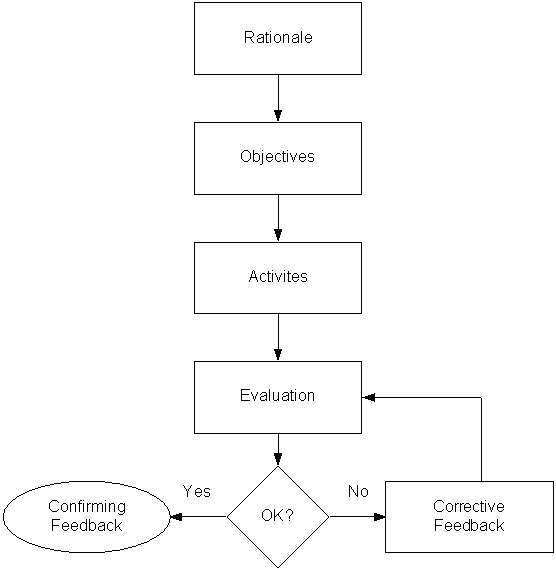
The application has been developed and now it is time to implement it in your company's business processes. There are many steps to implementation, but one component that is often overlooked or underserved is training and support.
Training and support for the end user is crucial when implementing a software or web solution in a business. You can't just throw it out there and expect people to use it right away. You can't just order them to use it because it's what's best for them. Your end users have to know what's in it for them and how it will improve upon the work they currently do.
When it comes to providing training and support for new technology solutions in business, I've seen it go in one of two directions:
- Every feature and function is explained and demonstrated in a long, drawn out process to the end user - even those that don't apply to their specific job role (the cram and flush theory).
- Very little is shown or demonstrated to the end user. Minimal support documentation is provided and end users are left to feel their way around and figure the application out for themselves.
- Rationale - Why is knowing this information important and what's in it for them.
- Objectives - What do they need to know specifically to do their job effectively.
- Activities - What activities will you have them do to learn the application (Note: studies in adult learning theory have shown that hands-on training provides a better learning experience than just "show and tell" demonstrations).
- Evaluation - What will you do to test your learners to see if they fully acquired the new skills you taught them.
- Feedback - Tell them whether or not they are correct in applying their new skills. If they are not, re-teach and re-evaluate until it is correct.
A presentation of this very topic can be found on my website. It can be downloaded directly from here (PowerPoint - 121k)
